Website Design
SaaS Pricing Page Design: Help Buyers Compare the Right Things
A pricing page checklist for marketing and product leads, with a pricing unit table, a plan difference matrix, an annotated fictional pricing page and next actions by buyer type.

A SaaS pricing page works when a buyer can tell, in one visit, which plan fits their team, what it will cost at their size and what to do next. Design the page around the unit buyers already count, the few differences that move them between plans and one clear action for each type of buyer. The plan cards matter less than the words that explain them.
This guide is for marketing and product leads redesigning the pricing page of a B2B SaaS website. It covers how pricing is communicated, not how prices are set. For the pricing page’s place among product, use-case and proof pages, see the SaaS website structure guide. The examples continue the fictional contract renewal tool used across this series.
Buyers look for this page early. In a 2013 article on showing prices, Nielsen Norman Group reported that business customers named pricing as the information they most need online, and that study participants left sites that hid it for competitors’ sites.
Choose the comparison unit buyers understand
Price in a unit the buyer already counts, and print that unit next to every price. A buyer who manages 40 people and 300 contracts can estimate a per-user or per-contract price in seconds, while a price per “workspace credit” sends them to sales with a question the page should have answered.
| Pricing unit | Buyer question it answers | What the page must explain | Risk when it is unclear |
|---|---|---|---|
| Per user | What does each person on my team cost? | Who counts as a user, and whether viewers or approvers pay | Buyers assume every invited person is billed |
| Flat per workspace | What does the whole team pay? | The limits that come with the flat price | Buyers cannot tell when they will outgrow the plan |
| Usage, such as contracts tracked | What will we pay at our volume? | What counts as one unit and what happens at the limit | Buyers fear an unexpected bill |
| Tiers by limit | Which tier holds our size? | The exact limit for each tier and how upgrading works | Buyers pick a tier they outgrow in the first month |
| Custom or enterprise | Can we get a quote for our requirements? | What triggers a custom price and how long a quote takes | Buyers read “Contact sales” as “too expensive” |
Show a sample scenario under the plans when the unit takes thought. Nielsen Norman Group recommends sample prices or a few representative scenarios over complex calculators, which its participants found slow and error-prone. In the fictional contract tool, one line does the work: “A procurement team of 12 tracking 300 contracts pays for 12 users on Team.”
Clarify limits, plan differences and billing context
Put the three to five differences that move a buyer between plans at the top of each plan, and move the full feature list into a comparison table below. Buyers choose a plan by its differences, so a long list of features every plan shares hides the reason to pick one.
The matrix below maps each plan difference in the fictional contract tool to the buyer question behind it, where the page answers it and the action that follows.
| Plan difference | Buyer question | Where the page explains it | Action it leads to |
|---|---|---|---|
| Contract limit on Starter | What happens when we pass the limit? | The line under the Starter price, and one FAQ answer | Compare Starter with Team |
| Approval workflows on Team | Can finance sign off inside the tool? | The top three features of the Team plan, and a row in the comparison table | Start a Team trial |
| Single sign-on and audit log on Enterprise | Will our IT team approve it? | The Enterprise plan, with a link to the security page | Talk to sales |
| Annual or monthly billing | What does each period cost, and can we cancel? | The billing toggle, labeled with both prices | Choose the billing period |
| Extra users | What does adding people cost? | The unit line under each price | Return to the sample scenario |
Nielsen Norman Group’s guide to comparison tables (Kate Moran and Taylor Dykes, 2024) names pricing packages as a fit for the format and gives rules that apply directly to plan tables. Compare about five options or fewer, fill in the same attributes for every option, keep the plan names visible as the table scrolls, translate technical terms into plain language and let people hide the rows where every plan is the same.
Check the billing details buyers look for before they commit:
- Billing period. The price shows the period, and the toggle states both the monthly and the annual figure.
- Limits. Every limit is a number with its unit, and the page says what happens when a team reaches it.
- Trial terms. The page says how long the trial lasts and what happens when it ends.
- Changing plans. The page says how upgrades and downgrades work during a billing period.
- Labels. “Most popular” or “Recommended” appears only when the claim is true for your customers.
Read the annotated pricing page
The pricing page below is a fictional example built for this guide, with fictional prices. Each number matches a row in the table under it.
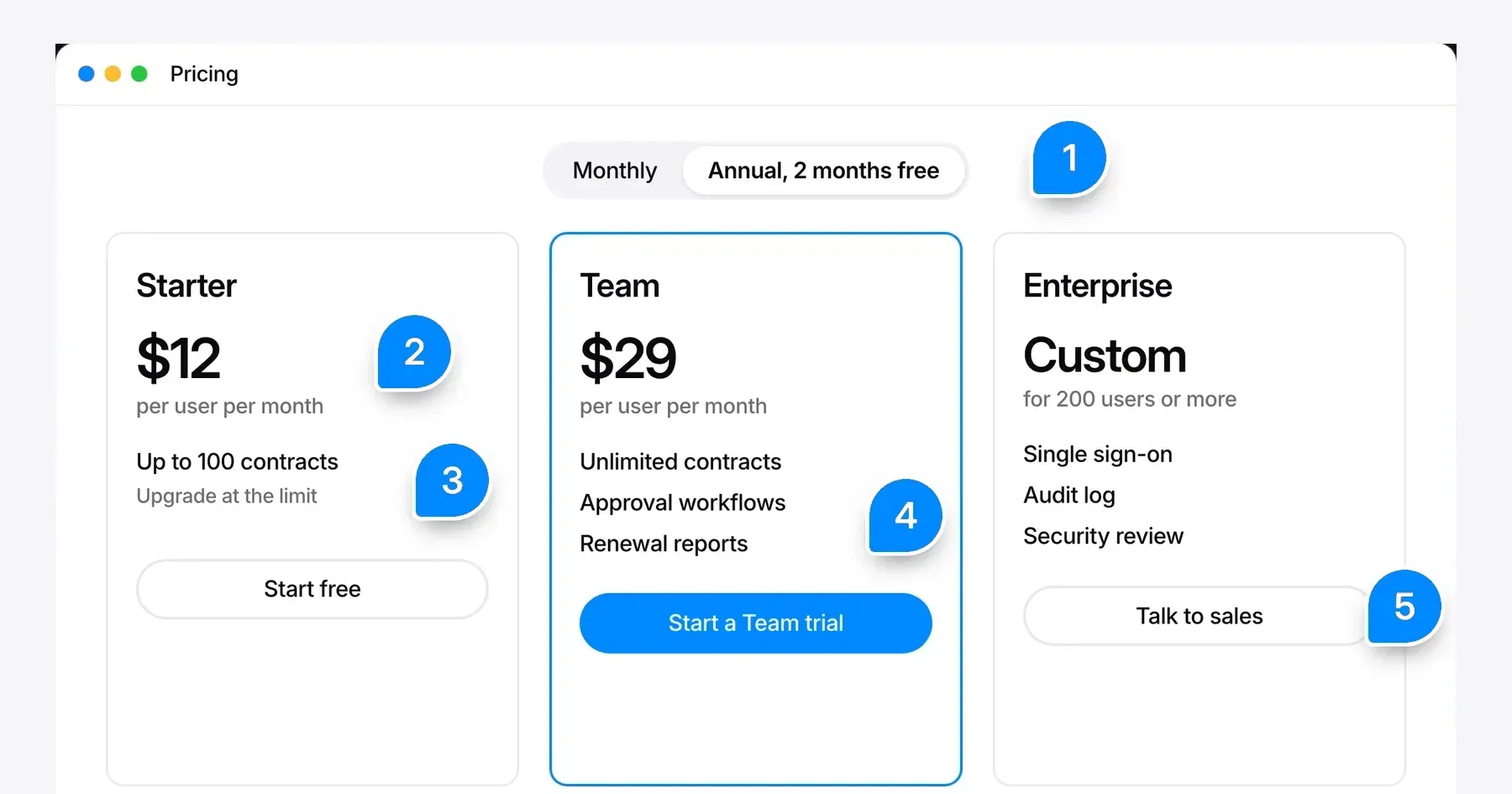
| Note | Element | What it has to do | Why it matters |
|---|---|---|---|
| 1 | Billing toggle | Show both periods and the difference between them | Buyers compare the annual figure with their budget line |
| 2 | Unit line | Say what the price counts, such as per user per month | The budget owner can multiply by team size without asking sales |
| 3 | Limit | State the contract limit and what happens at it | The buyer knows when Starter stops fitting |
| 4 | Plan differences | List the features that separate Team from Starter | The reason to choose the middle plan is visible without the full table |
| 5 | Enterprise action | Say what a sales conversation covers | “Talk to sales” reads as a next step, not as a hidden price |
Match proof and questions to buying uncertainty
Place each piece of proof and each FAQ answer beside the doubt it resolves: limits beside the limit, security beside the plan that includes it, cancellation beside billing. Proof collected in a band at the bottom of the page arrives after the doubt has already sent the buyer away.
| Buying uncertainty | Who has it | Proof or answer that resolves it | Where to place it |
|---|---|---|---|
| Is this plan for teams like ours? | Team lead | Customer names or a short quote from a team of a similar size | Under the plan that customer uses |
| Will IT and security approve it? | Technical or security reviewer | Single sign-on, data location and a link to security documents | In the Enterprise plan and its comparison rows |
| What if we outgrow the plan? | Budget owner | How upgrades work and how the price changes | Beside the limit and in the FAQ |
| Can we leave if it does not work? | Budget owner | Cancellation and data export terms | Beside the billing toggle and in the FAQ |
| How long until the team uses it? | Team lead | Setup steps, migration help and the trial length | Under the trial action |
Write the FAQ from real questions. Sales call notes, chat transcripts and support tickets show what buyers ask before they buy, and each answer belongs on the page in a sentence or two.
Keep the offer consistent with the rest of the site. The plan names, the product promise and the audience on the pricing page should match the homepage, so check the page against your homepage product clarity review before launch.
Review the next action for each buyer type
Give each plan one action that matches how that buyer buys, and say what happens after the click. A small team that wants to try the product needs a trial it can start alone, while a company that needs a security review needs a conversation with someone who can answer it.
| Buyer type | Plan | Primary action | What the label promises | What happens next |
|---|---|---|---|---|
| Small team trying the product | Starter | Start free | A working account without a sales call | Sign-up, then the first useful action in the product |
| Growing team with approvals | Team | Start a Team trial | Approval workflows during the trial | A trial with the Team features turned on |
| Company with security review | Enterprise | Talk to sales | A conversation about requirements and a quote | A booking page that states the call length and the agenda |
| Buyer still comparing | Any | Compare plans | The full comparison table | A jump to the table, with plan names that stay visible |
Use one primary button per plan and name it with what the next page does. “Get started” on every plan says nothing about the difference between a trial and a sales call.
Gestures follows the same rules on its own pricing page. As of November 17, 2026, the page lists $7,500 per month for ongoing work and $2,250 per week for a focused engagement, adds sample totals such as $4,000 for a two-week sprint and $22,500 for three months, states what sits outside the price and uses Book a Call as its primary action.
Test the finished page with five questions for someone in your target role: which plan fits your team, what would you pay at your size, what happens at the limit, who in your company would need to approve this, and what would you click next. Every answer the person cannot give from the page is a change to make.
Frequently asked questions
What should a SaaS pricing page include?
A SaaS pricing page should include the plans with their prices and pricing unit, the limits of each plan, the differences that separate the plans, the billing period and trial terms, proof placed beside each doubt, a short FAQ and one clear action per plan.
Should a B2B SaaS company show prices on its website?
A B2B SaaS company should show prices or sample prices whenever it can. Nielsen Norman Group reported that business buyers named pricing as the information they most need online and left sites that hid it. A sales-led company can still show plans, limits and representative scenarios.
How many plans should a SaaS pricing page show?
A SaaS pricing page should show few enough plans to compare side by side, which Nielsen Norman Group’s comparison table guidance puts at about five or fewer. Each plan needs a distinct buyer and a clear reason to choose it.
Where should the full feature comparison go?
The full feature comparison should go below the plan cards, as a table with the plan names kept visible while it scrolls. The plan cards carry only the few differences that decide the choice.
What should an enterprise plan show instead of a price?
An enterprise plan should show what triggers a custom price, the features and support it includes, and what happens after “Talk to sales”, such as the length and agenda of the first call.
Discuss your pricing page experience
Bring your current pricing page and the questions your sales team hears most often. Explore how Gestures approaches SaaS marketing website design, and we can walk through which buyer questions your page answers and which ones still go to a sales call.
Working through a decision like this?
Bring your current product or website and we can discuss what needs attention.
Keep reading