
Mobile App Design and Development
A considered experience,
from screen to interaction.
Gestures works with founders and product teams to design mobile experiences and develop a defined first version. We bring the app’s structure, interface and behavior into the same product conversation.
Our development workflow is AI-native, with AI tools forming part of how the application is built. Your app’s features are defined by what its users need.


For the next stage of your mobile product.
A first idea, a planned launch or an app that needs to evolve. The starting point is what people need to do and what the next version should make possible.
Founders Building a First App
Give the idea a manageable first scope. Identify the main user task, the screens it requires and the decisions that need testing before the feature list expands.
Teams Launching a Mobile Product
Connect the mobile experience to its implementation. Bring navigation, interface design and application behavior around the same product priorities.
Existing Apps Ready to Evolve
An unclear first-use experience, difficult navigation or inconsistent screens can signal the need for change. Start by discussing which changes matter and what the existing application can support.
The flow, the interface and the application around them.
A mobile product needs a clear path through its core task. The design and development scope brings the relevant screens, interactions and application behavior together. The platforms, technical requirements and delivery endpoint are agreed for your project.
- 01
App Definition & MVP Scope
Give the first version a clear boundary.
Define the intended user, the core task and the features needed to complete it. Platform decisions, dependencies and priorities establish what belongs in the first build and what can follow later.
- 02
Mobile UX & Interface Design
Make the experience understandable on a small screen.
We consider navigation, onboarding, content hierarchy and the primary task flows together. Layout, typography and controls give those flows a consistent visual form.
- 03
Prototyping & Interaction Design
Make key decisions tangible before the full build.
A prototype can help examine the sequence of screens and the way an interaction behaves. Its format should be explicit: a clickable design demonstrates a flow; a working prototype can examine defined application behavior.
- 04
AI-Native App Development
Carry the agreed experience into a working version.
AI tools form part of our development workflow. The application scope defines what is being built, including the relevant screens, states and functions, and the criteria used to review the delivery.
- 05
App Integrations
Identify the services the product actually needs.
If the app requires accounts, stored data, subscriptions, notifications or AI capabilities, discuss their feasibility, access requirements and operating responsibilities before including them in the engagement.
- 06
Testing & Release Preparation
Make the delivery state clear.
The scope needs to identify the flows to check, the environment used for review and the files or builds to deliver. Known limitations and any store-preparation work should be recorded explicitly.
For the wider interface and experience discipline, explore our product design service.
AI in the workflow.
A defined product at the center.
We use AI-native development to describe a workflow that includes AI tools in building the application. An app developed this way can support an everyday task without offering AI features to its users.
What matters for the engagement is the product being delivered: its intended behavior, the agreed design and the criteria used to evaluate it.
Start with the product intent
The user task and the agreed scope give the development work its direction. Decisions about screens and features need to serve that task.
Keep the design connected to the build
Navigation, visual hierarchy and interaction states need to remain explicit as the design becomes an application. A working version should be assessed against those decisions.
Define review and delivery
The engagement needs to establish who checks the work, which scenarios are reviewed and what the client receives. Those responsibilities belong in the scope alongside the implementation.
If the product needs an AI capability, that feature has its own requirements, including inputs, outputs, waiting states and unsuccessful requests. Explore AI-native product development for that product context.
A clear decision at each stage.
The first scope, the design and the working version answer different questions. Each stage should make the next commitment easier to assess. The sequence and review responsibilities are shaped around the agreed work.
- 01
Define
Establish who the app is for, the task it supports and the platform it needs to serve. Agree the first-version boundary and the requirements that affect it.
- 02
Design
Organize the core flow and give it a visual form. Review navigation, key screens and interaction decisions before they become implementation requirements.
- 03
Prototype
Examine the part of the experience that most needs testing. Record what the prototype demonstrates, what remains assumed and whether the scope needs to change.
- 04
Build
Develop the agreed application scope through the AI-native workflow. Keep the required screens and behavior connected to the design decisions.
- 05
Test & Deliver
Review the agreed scenarios, record known limitations and deliver the scoped outputs. Identify the next step and the owner of any further release or support work.
A first-use flow includes what happens when there is no content yet, when something is loading and when a request fails. If the app includes AI processing, the review also needs to consider how people understand the wait and try again after an unsuccessful result.
A mobile product of our own.

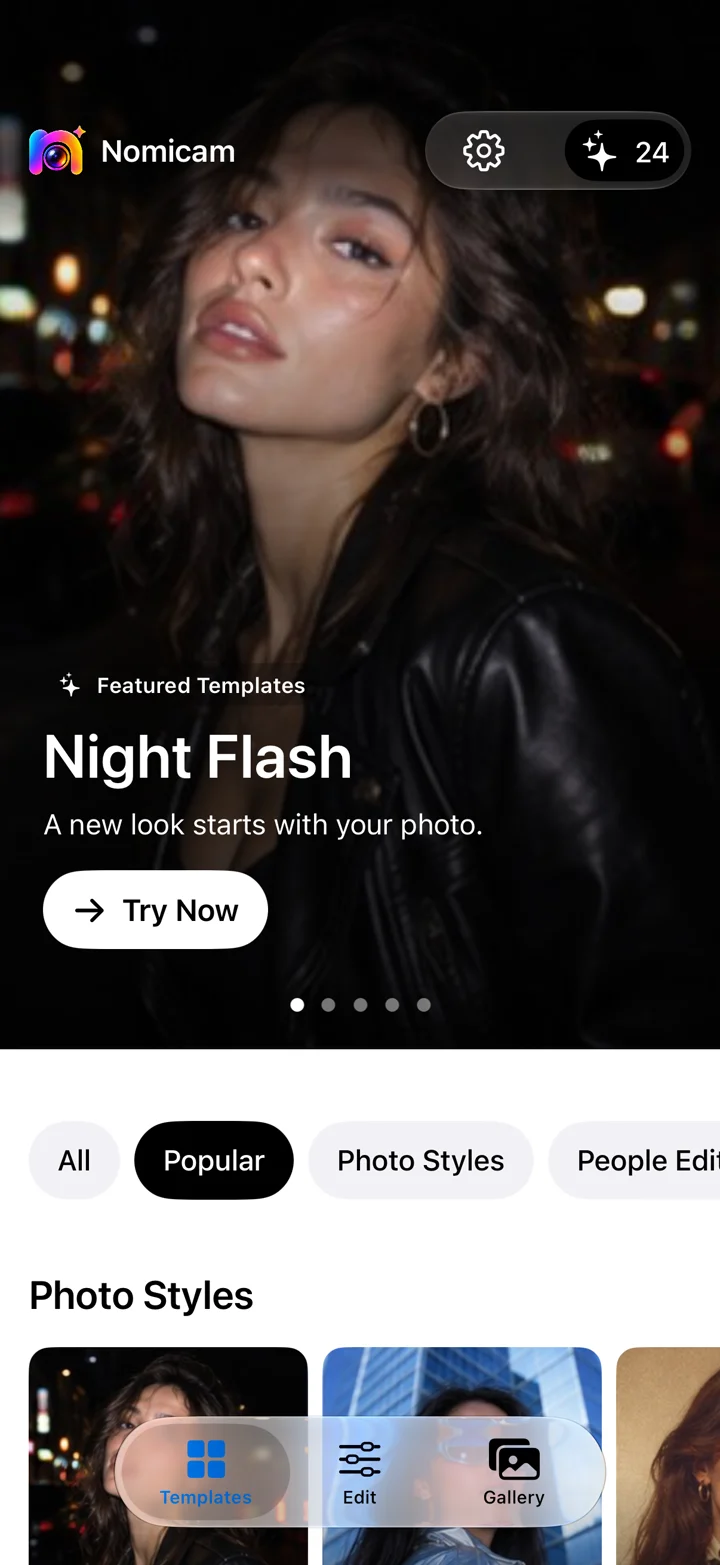
Nomicam
Studio-owned product · AI Photo Editor
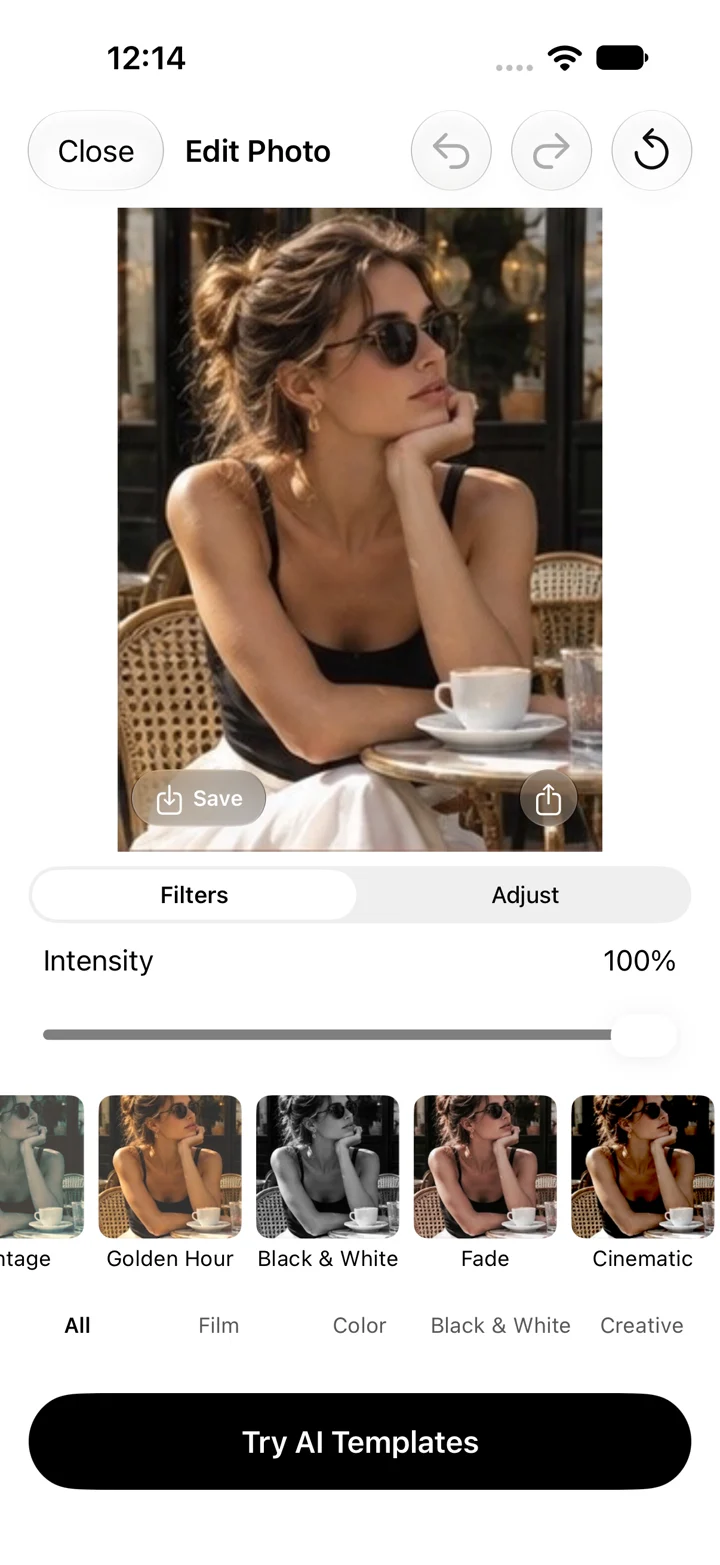
Nomicam combines AI-powered photo templates with editing tools. Its public product presentation follows a focused sequence: choose a template, add a photo and refine the result.
The template gives people a starting point; editing controls provide a place to adjust the image. These screens show how the product’s main task is organized as a mobile experience.
Agree the scope before the build.
Start with your app’s purpose, its current stage and the platform you need to reach. The engagement should make clear what will be designed, what will be developed and the state in which it will be delivered.
Define the work and its endpoint
A design prototype, a working test version and a store-published application are different deliverables. Specify the required stage and the work included in reaching it.
Establish accounts and responsibilities
Design files, source code, service access and app accounts need clear ownership and handover terms. Existing systems and any third-party dependencies also need to be identified.
Make costs and follow-on work explicit
Platform accounts, hosting, API usage and other services may create costs alongside the engagement. Their billing, any release work and the arrangements after delivery need to be established separately.
Meet the people behind Gestures ↗.
Monthly partnership
$7,500$10,500USD / month
Studio $7,500 + Growth $3,000 / month
For a few months of focused progress. The monthly plan suits ongoing product work and longer design sprints.
Lead Designer · Senior Designer · Account Manager
Work starts within 1 day of payment.
Cancel anytime.
Book a CallWeekly sprint
$2,250$4,000USD / week / 2 weeks
+ $3,000 / month for Growth
For a smaller feature, a focused website project or a shorter sprint. Choose a weekly engagement when the work needs a tighter horizon.
Save $500 with two weeks: $4,000 instead of $4,500.
Lead Designer · Senior Designer · Account Manager
Work starts within 1 day of payment.
Cancel anytime.
Book a CallAdd Growth to a studio plan
SEO, content strategy and content production, alongside your design team. Growth is billed monthly. Cancel anytime.
+$3,000 / month
Questions before we begin.
What is included in your mobile app design and development service?
The scope connects app definition, mobile UX and interface design, prototyping and AI-native development. The actual engagement specifies its screens, functions, review requirements and deliverables. Platform coverage, integrations, testing, store work and support are agreed for the project rather than assumed to be included.
What does AI-native development mean for my app?
It describes our development method: AI tools form part of the workflow used to build the application. The app’s scope, platform, review criteria and deliverables still need a clear definition. The term alone does not specify the technology or the release stage.
Does my app need AI features?
No. The development method does not require your app to offer AI functionality. Features should follow the user task. If an AI capability is needed, discuss its behavior and integration as a separate part of the product scope.
Which mobile platforms do you support?
Tell us which platform your app needs to reach. Platform suitability, existing systems and the required delivery stage need to be discussed before we confirm an engagement. Nomicam’s iPhone presentation is specific to that product and does not define every client project’s platform coverage.
Can we start with a prototype or MVP?
Yes. A prototype examines a particular flow or assumption, and an MVP is a limited version for real use. Tell us what needs to be learned and which parts of the experience need to work so we can establish an appropriate starting scope.
How long does a project take, and how is it priced?
Choose $7,500/month for ongoing, multi-month work or $2,250/week for a focused feature or website engagement. A two-week sprint is $4,000. Both include a Lead Designer, Senior Designer and Account Manager, and you can cancel anytime. The optional Growth plan adds $3,000/month for SEO, content strategy and content production; it is billed monthly only, with either plan. Product scope and development responsibilities are agreed for your engagement; this is not an all-inclusive price for a complete application.
What should your app help people do?
Tell us who it is for, where you are today and what you want the next version to make possible. We can discuss the scope and whether Gestures is the right fit.
Prefer email? Email us